
CompanionAPM / Client Books Watch
Accounting Practice Management · Client Books WatchKnow when a client’s books need a call.
Client Books Watch checks your clients’ QuickBooks every day and raises alerts you can act on from one screen.

A daily check with clear alerts
- A daily QuickBooks check across every enrolled client.
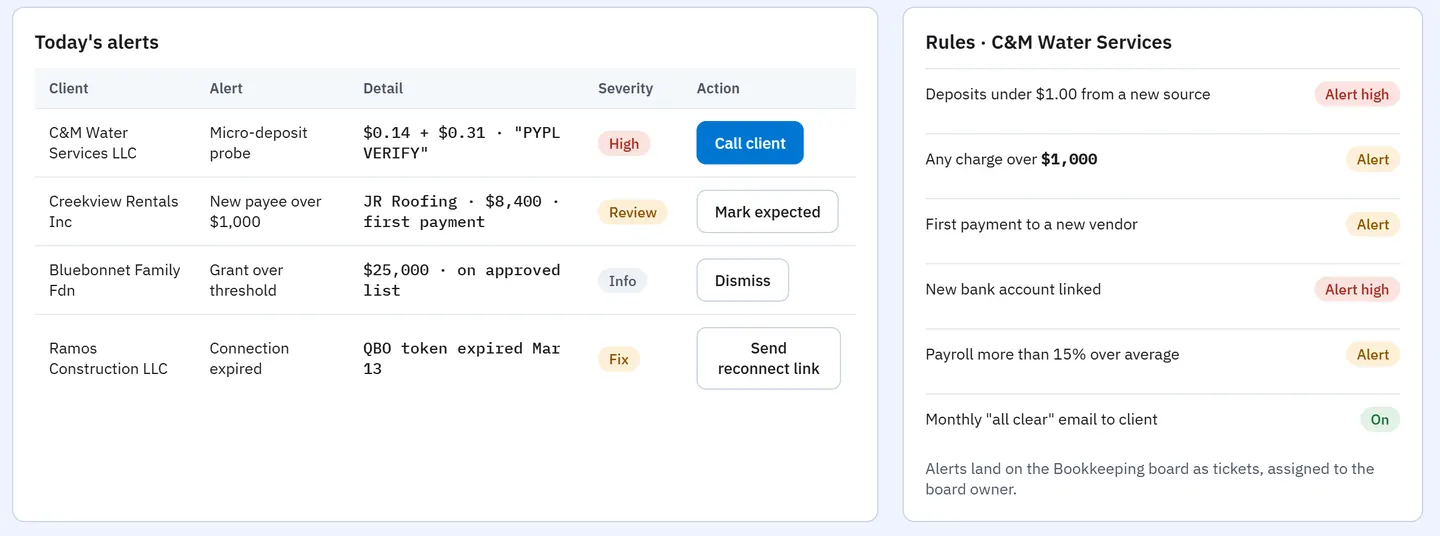
- Alerts show severity and detail, such as a micro-deposit probe, a new payee over a limit or an expired connection.
- One-click actions: call the client, mark expected, dismiss or send a reconnect link.
- Alerts land on the Bookkeeping board as tickets, assigned to the board owner.
Rules that fit each client
- Per-client rules, for example deposits under a small amount from a new source, any charge over a set amount, a first payment to a new vendor, a new bank account linked, or payroll above average.
- Each rule has its own level: alert or alert high.
- A monthly “all clear” email to the client can be switched on.
- Connection health shows how many clients’ QuickBooks connections are healthy.
More from CompanionAPM
Tax Engagements
Track every return from letter sent to e-filed.
Learn more →Client Portal & Document Intake
Clients see what’s needed and upload from any device.
Learn more →Time & WIP
One-click timer and a WIP digest that gets work billed.
Learn more →Product screens show sample data. CompanionAPM is in early access.
Early Access
Run your whole practice from one board.
Request early access to CompanionAPM. We review every request ourselves and invite firms in small groups.
- Request access. It takes about a minute.
- We review every request ourselves and match firms to where CompanionAPM fits best.
- When there’s room for you, a real person reaches out to set up your walkthrough.